Showing posts with label Moco Tools For Maya. Show all posts

Sunday, February 2, 2014

A friend of mine has closed the loop between maya and his system for doing IK track compensation moves. Ideal for multi-scale moves. Having looked into this myself years ago I know that this is non-trivial. Impressive work Gerald Thompson!


Demo showing creation of animated camera in Maya with export to Mantis Motion Control from Gerald Thompson on Vimeo.

Thursday, August 18, 2011

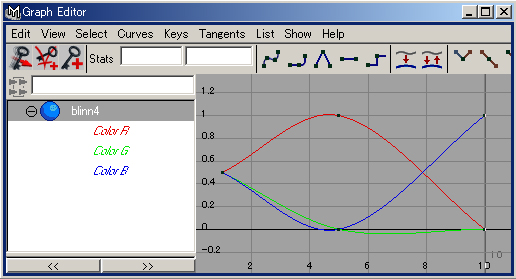
My First Animation Editor (With Bezier Curves)

I've been working on this on and off for a while now. Ever since I got Maya talking with the Arduino. I thought to myself, "wouldn't it be nice if there was a free app that wasn't bloated and designed just for animating parameters?" Well, I just hit my first milestone for this goal. Eventually I would like to add multi-segment Bezier Curves. Then I would like to have multiple channels of animation. It's all written in Processing so serial communication with the Arduino should be simple. The trickiest thing to get working was the lookup of the Y value on the curve based on where the Time Slider is. Many thanks to Ben Paschke for finding the function I needed in the Blender Source Code and helping me port it to Processing.

There is another Processing Tool out there called Timeline but it's heading in a different direction than I am and I wasn't a fan of it's mixed languages and non-realtime Y lookup function. Plus, I thought this would be a good challenge to set for myself considering the industry I am working in :)

Hotkeys:
Spacebar = Play/Pause
J = Play Forward
K = Play Backward
L = Pause
Left Arrow = Step Backward 1 Frame
Right Arrow = Step Forward 1 Frame 

Click and Drag to Position the Handles or Timeslider

Friday, July 15, 2011

Genuflex Virtual Axis Formula

A Sketch to Demo the core Function of the Virtual Axis on Genuflex Motion Control Rigs


 http://www.general-lift.com/GLMoCo/Products/Genuflex_Mk3/Prod_mk3_p1.html

Notice how the length of the Hypotenuse(c) stays fixed on the triangle no matter where you move the rig.

Please Note that this only demos the Z,Y axis an not the X,Z axis. But the principle is the same for X,Z and gives full 3D positional control of the rig as long as the boom (Hypotenuse) is long enough to accommodate the max distance of where you want to place the camera(mouse in this case).

Tuesday, December 21, 2010

My First Bezier Curve

Taken from the math on this page. Apparently this is about as simple as it gets as far as bezier curves go. I'm hoping to try and recreate a few of the examples on this page before going any further.

Monday, June 29, 2009

DIY Moco Update

So it's been several weeks since I posted any real progress on the DIY Moco front. So here is a bit of an update.

MOCO TOOLS FOR MAYA
I was almost ready to release the software, but as I was going over the code I came across a few fatal flaws in my design :( The most obvious was that my position engine could only support one stepper motor! I thought it would be easy to make it support more. But due to the dynamic nature of the engine, I would have to resort to some serious multi threaded type coding and interrupts to get it to work the way I want. If you are not familiar with the Moco Tools For Maya project, here's an example clip. This is just one piece of a much larger idea :)

REVELATIONS
I discovered a new micro controller platform which is slowly louring me into it's multi-core ways. It's called Propeller and it's made by Parallax. I'm interested in it because it can run up to 8 parallel loops due to it's multi-core design. So in my case I would use one for serial communication, one for file reading and buffering and the other 6 would each have their own position control engine. Each Proc is called a "Cog" and while they function independently, they can all talk to each other as well!

If I was just reading the move data from a file, all of this would be much easier. But I am really interested in the interactive position control for all six stepper motors at the same time. This is why I'm seriously considering the propeller for this for this project.


STUDY
On the weekend I attended an Arduino Physical Computing class. It was run by a couple of guys for the Adelaide Dorkbot chapter. Check out this post for more info. Fun was had by all!

At my real place of work I have be learning pftrack. It's a piece of software used for extracting a moving 3D camera from 2D footage. It's not the funnest job I've had to do, but iteresting none the less.

I've also been learning Perl and Processing. Why Perl you ask? The current interface for the openMoco timelapse engine is written in Perl. So if I am to speak to it, I need to know it's language (well, a little :) Why Processing? It's visual! and it plays nice with Arduino and I am in the early stages of writing a generic animation editor. Like the ones you see in most animation packages, only much simpler.

TALKS
A few weeks back I did a talk about my motion control adventures for our local chapter of Dorkbot. It was well received.

Tomorrow night I am doing a talk for the Australian Video Producers Association. I'm tag teaming it with a friend of mine who is a professional timelapse photographer. Check out his work! I think it's beautiful.

Wednesday, May 27, 2009

Moco Tools For Maya (Under The Hood)


This Video covers the current state of the Maya/Python/Serial side of things. I will cover the Arduino side in another video.

Warning: Some viewers may find this a bit dry and boring.
Duration: 35mins.

Saturday, May 16, 2009

DIY Motion Control Rig - Design Concepts

I'm currently in collaboration with a couple of chaps from Ohio of all places! I put together this video to explain the origins of my plans to build my own Motion Control Rig. I thought some of you might be interested also as it explains some of the core design concepts in regards to the rig's 6 degrees of freedom.


For an overview of the pipeline visit this post.

Saturday, April 25, 2009

Maya To Moco Sneak Peak


A sneak peak at a set of Maya Tools that can control servo and stepper motors. It uses the Arduino platform as a bridge between Maya and the Motors. I will be releasing the tools on the openMoco website soon.

Friday, April 10, 2009

DIY Motion Control Rig

Preamble
Ok, so usually I'm not in the habit of blogging my over ambitious ideas. They never usually eventuate so I like to keep them in my head. But since I started this blog, I have noticed that all of my tinkering has began to carve it's own path to the one common goal. Building my own motion control rig of coarse! So in this post I will simply layout some of my plans and direction for all of my future tinkering with motion control.
Background
I've been wresting with the idea of affordable motion control for years. Ever since I found out that the rig I was designing an interface for costs around 100 grand to buy! I was lucky enough to get to play with and study one of these rigs when I was studying at visual effects at film school. Through some reverse engineering and a lot of late nights I was able to discover all of the formulas that make this rig's movements so dynamic! but more about that in another post. I recreated a virtual version of this rig in a 3D animation program called Maya. I wrote some software (with help) that exported the move data to a file which could later be read by the real rig's software and translated into an actual move. The software has since proven itself as a reliable industry tool used on many TVCs and several short films. Less than a year ago I discovered micro controllers and stepper motors. I quickly realized that I had the basic ingredients and experience to make my own rig with the same six degrees of movement that I had already come accustomed to at film school. So here I am, a Full Time Visual Effects Artist, Married with a 1 year old boy and enough ideas to last several lifetimes. I guess that's why they call it a hobby :)
Software Features
- Maya to Motion workflow(already exists) - Ability to program Dual Scale Moves (I have the secret formula :) - Ability to play back the move at any frame rate - Processing timeline GUI with animation curves (Here's a WIP) - Move Data Exporter (not written yet) - Move Data importer and Cache system for playback (not written yet)
Hardware Features
- Arduino (1 or many, what ever it takes) - Stepper Drivers (still researching the right one for my needs) - Stepper Motors (synced to the sync pulse of the video/film camera) - Crane on a Dolly with Pan Tilt and Roll head (adjustable nodal point) - Tracks (custom to begin with) - Basic LCD programmable interface for timelapse shoots.
Summary
So these are just some of the Ideas I have kicking around. I must stress, this is a Hobby, not a business(not yet). So I am comfortable sharing this info without commitment. You know how it is no expectations, no let downs :) It works for me! Won't you join me as I push my brain until it hurts. Right that's the last time I ramble on about myself I promise. From now on it will be practical and hopefully helpful posts from me on motion control.

Sunday, August 31, 2008

Maya + Python + Arduino + Servo (Part 2)


An update on the previous video. This time I have written a Python Plugin for maya. This makes it now possible for real time (viewport to servo) communication, without the need for dynamic playback. So now it is possible to literally keyframe your servo's position in time and playback it's animation!

A big thank you to John Park for blogging about these Ideas on the Make Blog. Check out what people have to say about it here

Edit: I have made some progress on this technique click here for more info

Tuesday, August 26, 2008

Maya + Python + Arduino + Servo (Part 1)


This is something that has been going around in the back of my head for a while now. It's amazing what you can find online these days. Practically all of the code for this setup is borrowed from other sources. So thanks to everyone who's contributed to this by posting their own projects on the web.

Here are the links to the main contributors:
http://www.arduino.cc/en/Reference/ASCIIchart
http://principialabs.com/arduino-serial-servo-control/
http://pyserial.wiki.sourceforge.net/pySerial
http://principialabs.com/wp-content/uploads/servo.py
http://www.digitaltutors.com/store/

I will post more details on this project as I get time. I'm am planning to document this whole Idea exhaustively.
This is just the beginning...

If you liked this post, check out PART 2 for some further progress